The Ultimate Guide to Choosing a USB Digital Microscope: Top Uses for UK Professionals in 2026
A practical buyer's guide covering how to pick the right USB digital microscope for industrial inspection, electronics repair, and scientific work — with real specs, pricing, and hands-on advice from someone who's used these tools daily in a Belfast workshop.
What Is a USB Digital Microscope?
A USB digital microscope is a magnification tool that connects to a computer, tablet, or standalone display to provide real-time enlarged images of small objects and surfaces. Unlike traditional optical microscopes, these units capture digital images at magnifications typically ranging from 10x to 2000x, with output sent directly to a screen for inspection, documentation, or sharing.
I've been using one in my workshop on Cregagh Road for the better part of three years now. Started with a cheap £30 unit from Amazon. Honestly? It was rubbish. Blurry at anything above 100x, terrible lighting. But it showed me the potential.
The technology's come a long way since then. Modern digital USB microscopes offer HD or even 4K image capture, adjustable LED illumination, and measurement software that lets you take precise readings right on screen. For anyone doing close-up inspection work — whether that's PCB soldering, quality control, or biological sample analysis — they're brilliant.
Why UK Professionals Are Choosing a USB Digital Microscope in 2026
Cost is the obvious answer. A decent compound microscope with camera attachment runs £800–£2,000+. A professional-grade digital microscope with integrated display? You're looking at £150–£500 for something genuinely capable.
But it's not just about money. Three things have driven adoption this year:
Documentation and Compliance
UK workplace regulations under the Health & Safety Executive (HSE) increasingly require photographic evidence of inspections. A digital microscope captures images and video automatically. No separate camera needed. No faffing about with eyepiece adapters.
Remote Collaboration
Since 2020, remote working hasn't gone away — it's embedded. Engineers in Manchester can now view live microscope feeds from a lab in Edinburgh. That's genuinely useful when you need a second opinion on a suspect solder joint at 9pm on a Tuesday.
Ease of Training
Traditional microscopes require skill to use properly. Focusing, adjusting interpupillary distance, managing eye fatigue. A screen-based digital microscope? Anyone can look at it. I've trained apprentices on mine in about ten minutes flat.
Top Uses for Digital USB Microscopes Across UK Industries

Electronics Repair and Micro-Soldering
This is where I use mine most. Inspecting mobile phone logic boards, checking solder bridges on 0402 components, verifying BGA connections after reflow. At 50x–200x magnification, you can spot cold joints, micro-cracks, and contamination that are completely invisible to the naked eye.
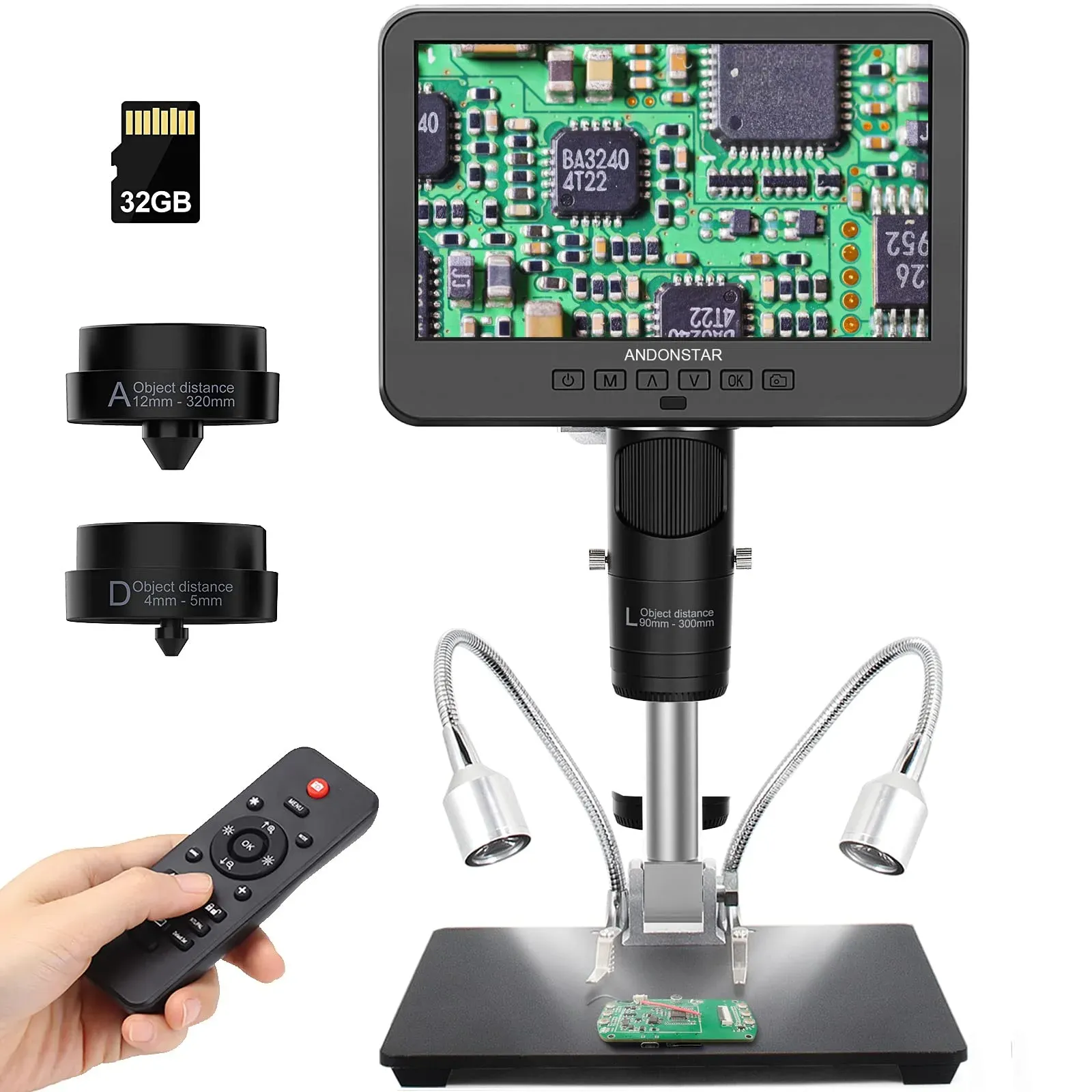
The AD246S-M model from andnstrhan is particularly well-suited here — its 7-inch integrated screen means you don't need a laptop cluttering your bench. At £164.15, it sits right in the sweet spot for professional repair shops.
Industrial Quality Control
Manufacturing facilities across the UK use magnification tools for surface finish inspection, weld quality assessment, and dimensional verification. A digital inspection microscope with measurement software can verify tolerances to ±0.01mm at working magnifications — that's more than adequate for most QC applications covered by BSI (British Standards Institution) quality frameworks.
Scientific Research and Education
Universities and secondary schools have adopted USB-connected microscopes for teaching because they solve the "one student, one eyepiece" problem. Project the image on a classroom display and thirty students see the same thing simultaneously. Brilliant for engagement.
Jewellery and Watchmaking
Hallmark verification, gemstone grading, movement inspection. The magnification range of 20x–300x covers most horological and gemmological needs. Several jewellers I know in Belfast's Cathedral Quarter switched from loupes to digital units last year and haven't looked back.
Forensic and Document Analysis
Examining signatures, verifying print quality, detecting counterfeits. The ability to capture timestamped images creates an evidence chain that traditional optical tools simply can't match.
Biological and Botanical Work
Entomologists, botanists, and mycologists use portable digital microscopes for field identification. Not a replacement for a proper compound microscope in the lab, mind you — but for initial field assessment at 40x–400x, they're spot on.
Key Features When Selecting a USB Digital Microscope

Right, here's where people get confused. Spec sheets are full of numbers, but which ones actually matter? Based on my experience testing half a dozen models over the past two years, here's what to prioritise.
Magnification Range
Don't chase the highest number. A microscope claiming "2000x" on a tiny sensor is giving you empty magnification — enlarged pixels, not extra detail. For most professional work, 50x–500x optical magnification is the useful range. Anything beyond that needs proper optics, not digital zoom.
Sensor Resolution
Minimum 2MP for basic inspection. 5MP for documentation you'll include in reports. The AD246S-M's sensor captures at full HD resolution, which is more than adequate for electronics work and produces clean images at up to 200x.
Working Distance
This is the gap between the lens and your subject. Too short and you can't get tools in underneath. For soldering work, you want at least 50–100mm working distance at useful magnifications. Sounds obvious, but I've seen people buy microscopes that need to be 10mm from the board. Useless for active repair.
Illumination
Adjustable LED ring lights are standard. Look for models with brightness control and ideally polarisation options to reduce glare on shiny surfaces like solder or polished metal. Eight LEDs minimum; some professional units offer 16 or more., a favourite among Britain’s tradespeople
Display Options
Three categories here: USB-only (needs a computer), standalone with integrated screen, or HDMI output to external monitor. For bench work, an integrated display like the 7-inch screen on the AD246S-M keeps your setup self-contained. For lab environments where you're already at a workstation, USB-only is fine and usually cheaper.
Software and Measurement
Calibrated measurement tools are essential for QC work. Look for software that offers linear measurement, area calculation, and angle measurement. Some models include these built into the device firmware; others rely on companion PC software.
USB Digital Microscope Comparison: 2026 UK Market
I've put together a comparison of models currently available to UK buyers. Prices checked June 2026.
| Feature | AD246S-M (andnstrhan) | Budget USB Models (£25–50) | Mid-Range Standalone (£200–350) | Professional Lab Units (£500+) |
|---|---|---|---|---|
| Price (inc. VAT) | £164.15 | £25–£50 | £200–£350 | £500–£2,000+ |
| Display | 7-inch integrated | PC/laptop required | 4.3–5 inch integrated | 7–10 inch or HDMI out |
| Magnification | Up to 260x | 20x–1000x (claimed) | 50x–500x | 10x–2000x (optical) |
| Best For | Electronics repair, micro-soldering, mobile board work | Hobbyist use, basic inspection | General professional inspection | Laboratory, research, metrology |
| Working Distance | 50–150mm | 10–30mm typical | 40–100mm | 50–200mm |
| Image Capture | Yes — onboard storage | Via PC software | MicroSD card | Multiple formats, network capable |
| Measurement Tools | Built-in software | Basic PC software | Limited on-device | Full calibrated suite |
| UK Suitability | Excellent — professional repair shops | Hobbyist only | Good — general trade use | Specialist labs and QC departments |
How to Choose the Right Digital Microscope for Your Work

So what's the catch? There isn't one single "best" model — it depends entirely on your application. Here's my decision framework after years of using these tools.
Step 1: Define Your Primary Application
Electronics repair needs 50x–260x with long working distance. Biological work needs 40x–1000x with transmitted illumination. QC inspection needs calibrated measurement tools. Don't buy a microscope designed for one job and expect it to excel at another.
Step 2: Consider Your Workspace
Got a dedicated bench? A standalone unit with integrated screen keeps things tidy. Working mobile or on client sites? A compact USB model with laptop connection makes more sense. My workshop's not massive — about 4m x 3m — so the self-contained AD246S-M works perfectly without eating desk space with a separate monitor.
Step 3: Budget Realistically
I know the price seems steep when you can get a "1000x microscope" for £30 on Amazon. But I've been down that road. The image quality difference between a £30 unit and a £164 professional model is night and day. You genuinely get what you pay for here.
That said, if you're just checking the odd solder joint occasionally, a budget model might be fine. But if it's a daily tool — and for most professionals it becomes exactly that — invest properly. (Seriously, the cheap ones end up gathering dust within a month.)
Step 4: Check Compatibility
USB microscopes should work with Windows 10/11 and macOS without driver issues in 2026. But verify. Some cheaper models still ship with Windows-only software. If you're running Linux workstations, check community driver support before buying. Standalone units with integrated displays sidestep this entirely.
Step 5: Think About Future Needs
Will you need to share images with clients? Record video for training? Connect to a larger display for team inspections? The AD246S-M from andnstrhan handles all of these through its built-in capture and output options — worth considering even if you don't need those features today.
Products used in professional settings should also comply with relevant UK product safety regulations, so verify CE/UKCA marking on any unit you purchase.
Frequently Asked Questions
What magnification do I need for electronics repair with a USB digital microscope?
For most electronics repair and micro-soldering work, 50x to 260x magnification is the practical range. This covers SMD component inspection (0402 and larger), solder joint assessment, and PCB trace verification. The AD246S-M provides up to 260x, which handles mobile phone board-level repair comfortably. Higher magnifications exist but rarely add useful detail for repair work.
Can a USB digital microscope replace a traditional optical microscope?
For inspection, documentation, and most professional applications — yes. Digital microscopes offer superior image sharing, recording, and measurement capabilities. For advanced biological research requiring fluorescence, phase contrast, or magnifications above 1000x with true optical resolution, a compound microscope remains necessary. For 90% of industrial and repair tasks, though, digital units are the better choice.
How much should I spend on a professional digital microscope in the UK?
For professional daily use, budget £150–£350. The sweet spot for electronics repair is around £164 — the AD246S-M price point — which gets you a 7-inch display, adequate magnification, and built-in capture. Below £100, image quality drops significantly. Above £500, you're into specialist laboratory territory that most trade professionals don't need.
Do USB microscopes work with Mac and Windows computers?
Most modern USB microscopes are compatible with both Windows 10/11 and macOS using standard UVC (USB Video Class) drivers, requiring no additional software installation. Standalone models with integrated displays — like 7-inch screen units — don't need a computer at all. Always verify compatibility before purchase, as some budget models ship with Windows-only measurement software.
What's the difference between optical and digital magnification on a USB microscope?
Optical magnification uses lenses to resolve genuine detail — this is real magnification. Digital magnification simply enlarges pixels, adding no new information. A microscope claiming "2000x" typically offers 200–500x optical and the rest digitally. For professional work, only optical magnification matters. Look for specs stating optical range specifically, and treat digital zoom claims with scepticism.
Are USB digital microscopes suitable for quality control inspections?
Yes — digital microscopes with calibrated measurement software can verify dimensions to ±0.01mm accuracy at working magnifications, meeting requirements for most BSI-standard QC processes. They also provide automatic image documentation with timestamps, creating audit trails that satisfy ISO 9001 quality management requirements. For metrology-grade measurement, dedicated measuring microscopes remain preferable.
Key Takeaways
- A USB digital microscope is the most cost-effective magnification tool for UK professionals — delivering HD imaging, measurement, and documentation from £150–£350 versus £800+ for traditional alternatives.
- The AD246S-M at £164.15 represents strong value for electronics repair and micro-soldering, combining a 7-inch integrated display with professional-grade optics and built-in image capture.
- Magnification claims above 500x on budget models are typically digital zoom — prioritise optical magnification range and sensor quality over headline numbers.
- Working distance matters as much as magnification — for active repair work, you need 50–150mm clearance between lens and subject to use tools underneath.
- Standalone display models eliminate computer dependency, keeping workbenches clear and reducing setup time for daily professional use.
- Documentation capabilities satisfy UK compliance requirements — timestamped image capture creates audit trails for HSE and BSI quality frameworks.
- For 2026, the market offers genuine professional tools from £150 — there's no longer a valid reason to struggle with inadequate magnification in professional settings.
Ready to try Andnstrhan?
Shop Now — £257.40