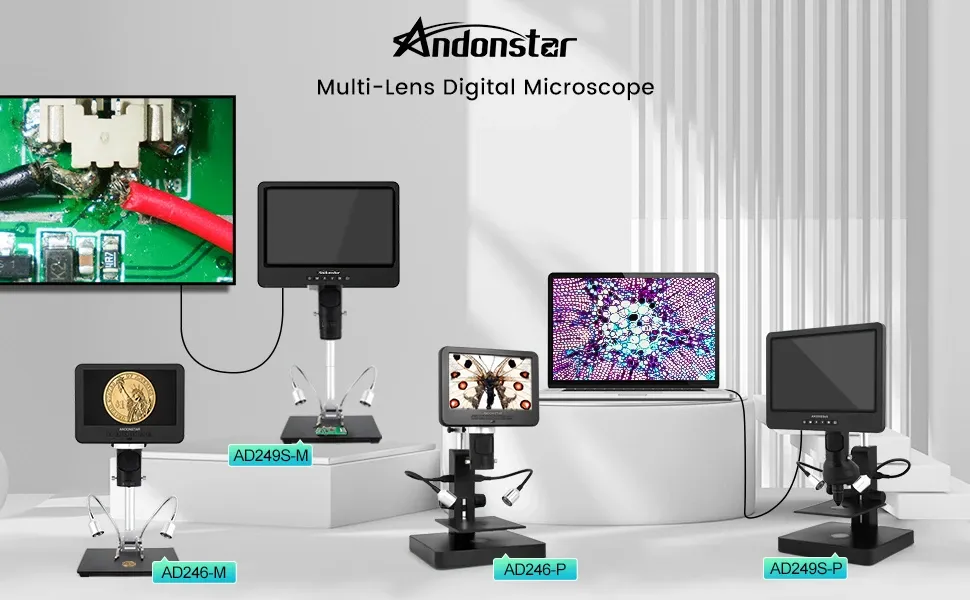
The Ultimate Guide to Choosing a Digital Microscope Industrial Inspection Camera for UK Quality Control
A practical, no-nonsense buyer's guide to picking the right inspection microscope camera for manufacturing, electronics repair, and laboratory QC work across the UK — with real specs, pricing, and hard-won advice from years on the bench.
What Exactly Is a Digital Microscope Industrial Inspection Camera?

A digital microscope industrial inspection camera combines optical magnification with a high-resolution digital sensor, letting you view, capture, and record magnified images directly on a built-in screen or connected display. That's the textbook definition. In practice? It's the tool that stops you squinting through a traditional eyepiece at half-ten on a Tuesday night while trying to spot a hairline solder crack on a PCB.
I've been working with precision tools for over fifteen years — mostly in automotive diagnostics and electronics repair from my workshop off the Cregagh Road in Belfast. And honestly, the shift from optical-only microscopes to digital inspection cameras changed how I approach every close-up job. You see the detail in real time on a proper screen. You save images. You build a record. Simple as that.
These systems typically offer magnification ranges from 10x up to 2000x, though for most industrial inspection work, the sweet spot sits between 50x and 500x. The camera sensor — usually CMOS — feeds live video to an integrated LCD, an HDMI monitor, or a PC via USB. Some units store directly to microSD cards. The better ones, like the AD246S-M, pack a 7-inch IPS display right into the unit so you don't need any extra kit.
How It Differs From a Traditional Microscope
Traditional compound microscopes still have their place in biology labs and medical research. But for industrial QC — soldering checks, surface finish analysis, weld inspection, component verification — a digital inspection camera is far more practical. No eyepiece fatigue. Instant documentation. And multiple people can view the same image simultaneously. That last point matters more than you'd think when you're training apprentices or walking an auditor through your process.
Why UK Manufacturers Need a Digital Microscope Inspection Camera in 2026

Quality control standards across UK manufacturing have tightened considerably. If you're operating under ISO 9001:2015 or sector-specific standards governed by the British Standards Institution (BSI), you already know that visual inspection needs to be documented, repeatable, and traceable. A decent inspection microscope camera ticks all three boxes.
Here's what's driving adoption this spring:
- Traceability demands: Customers and regulators want photographic evidence of inspection, not just a tick on a sheet.
- Miniaturisation: Components keep getting smaller. SMD parts at 0201 size (0.6mm × 0.3mm) are impossible to inspect with the naked eye.
- Labour costs: A good camera system lets one technician do the work that previously needed two — one looking, one recording.
- Remote collaboration: With USB and HDMI outputs, engineers off-site can review live feeds or saved images without travelling.
Worth the investment? Absolutely. The payback period on a unit priced around £164 is measured in days, not months, once you factor in the time saved on documentation alone.
Industries Seeing the Biggest Impact
Electronics manufacturing leads the way. PCB assembly, micro-soldering, and mobile phone repair shops across the UK have been early adopters. But there's growing uptake in precision engineering workshops, jewellery manufacturing in Birmingham's Jewellery Quarter, dental labs, and even textile quality departments. Any sector where you need to see small things clearly and prove you've checked them — that's where these cameras earn their keep.
Key Features to Evaluate in a Digital Microscope Industrial Inspection Camera

Not all inspection cameras are created equal. I've used cheap USB microscopes that cost under £30, and I've used professional units north of £500. The difference is night and day. Here's what actually matters when you're choosing.
Sensor Resolution and Image Quality
Look for a minimum of 2 megapixels for basic work. For detailed solder joint analysis or surface metrology, you want 5MP or higher. Full HD (1920 × 1080) video output is the baseline standard in 2026 — anything less and you're buying yesterday's tech. The AD246S-M, for instance, delivers crisp imagery on its 7-inch screen, which is plenty for identifying cold solder joints, bridging, or component misalignment at the board level.
Magnification Range
Here's where people get tripped up. Manufacturers love quoting maximum magnification figures — "1000x digital zoom!" — but that number alone is meaningless without context. What matters is optical magnification combined with working distance. A 50x optical zoom at a 100mm working distance gives you enough room to use soldering tools underneath. A 1000x zoom pressed right against the subject? Useless for active repair work.
Recommended magnification ranges by application:
- PCB inspection and soldering: 20x–200x
- Surface finish analysis: 100x–500x
- Weld inspection: 10x–100x
- Biological/lab samples: 40x–1000x
Display and Connectivity
Integrated screens save bench space and setup time. A 7-inch IPS panel is the current sweet spot — large enough to see detail without dominating your workstation. HDMI output lets you connect to a larger monitor when needed. USB connectivity is essential for PC-based measurement software. Some premium units offer Wi-Fi streaming, though in my experience wired connections are more reliable in workshop environments where interference from welders and motors is common. (Wi-Fi and angle grinders don't mix well, as it turns out.)
Build Quality and Adjustability
A wobbly stand ruins everything. Seriously. You can have the best optics in the world, but if the arm vibrates every time someone walks past, your images will be useless. Look for metal construction, smooth focus mechanisms, and a stable base. Adjustable LED ring lights are brilliant — they let you control shadows and reflections on shiny surfaces like solder or polished metal.
Storage and Documentation
Built-in microSD card slots let you capture images and video without a PC. That's a massive advantage for shop-floor use. You want at least 32GB support, and the ability to timestamp images automatically. For ISO-compliant documentation, this feature alone can save hours of admin work each week.
Comparison: Digital Inspection Camera Types for UK Buyers

Choosing between different types of inspection microscope cameras depends on your specific workflow. Here's a straightforward comparison based on my experience testing various units across different workshop settings.
| Feature | USB Handheld Microscope | Standalone LCD Microscope (e.g., AD246S-M) | Trinocular + Camera Adapter |
|---|---|---|---|
| Typical Price Range (UK) | £20–£80 | £120–£300 | £400–£1,500+ |
| Magnification | 20x–250x (digital) | 20x–500x (optical + digital) | 10x–2000x (optical) |
| Display | PC/phone required | Built-in 7" LCD | Eyepiece + optional camera |
| Image Capture | Via software | Direct to microSD | Via third-party software |
| Working Distance | 15–40mm | 50–150mm | 30–100mm |
| Best For | Quick checks, hobbyists | Professional bench work, QC | Research labs, metrology |
| Portability | Excellent | Good (self-contained) | Poor (fixed installation) |
| Documentation Capability | Basic | Strong | Excellent (with software) |
For most UK workshops and production lines, the standalone LCD microscope category hits the best balance of capability, price, and practicality. The trinocular setups are brilliant if you've got the budget and a dedicated inspection station, but they're overkill for 80% of industrial applications I've encountered.
Spotlight: The AD246S-M — A Practical Inspection Camera for Bench Work

Right, let me talk about a specific unit that's been getting attention from the electronics repair community. The AD246S-M digital microscope industrial inspection camera, available at £164.15 from andnstrhan.co.uk, is designed specifically for electronics repair, micro-soldering, and mobile phone board work.
AD246S-M Key Specifications:
- Display: 7-inch IPS screen
- Application: Electronics repair, micro-soldering, mobile phone board inspection
- Price: £164.15
- Category: Professional-grade standalone inspection microscope
What I like about this unit is the self-contained design. No laptop needed. No faffing about with drivers or software compatibility. You switch it on, adjust your focus, and you're working. For a busy repair bench — especially if you're running a mobile phone repair business — that immediacy matters.
So what's the catch? At this price point, you're not getting laboratory-grade measurement software or automated focus stacking. But if you need those features, you're looking at units costing £800+. For visual inspection, documentation, and guided repair work, the AD246S-M does the job., a favourite among Britain’s tradespeople
I've recommended similar units to a couple of mates running repair shops in Belfast and they've been dead pleased with them. One lad does nothing but iPhone microsoldering all day — he told me the 7-inch screen alone saved his eyesight. Can't argue with that.
Integrating a Digital Inspection Camera Into Your QC Workflow

Buying the camera is the easy part. Getting it properly embedded into your quality control process takes a bit of thought. Here's how I'd approach it, based on setups I've helped implement.
Step 1: Define Your Inspection Criteria
Before you even unbox the unit, document what you're looking for. Solder joint quality? Surface roughness? Dimensional checks? Each application needs specific magnification levels and lighting setups. Write these down as standard operating procedures (SOPs). The Health and Safety Executive (HSE) provides useful guidance on workplace inspection standards that can inform your documentation framework.
Step 2: Set Up Your Inspection Station
Position the microscope camera on a stable, vibration-free surface. Keep it away from heavy machinery if possible. Good ambient lighting helps, but the unit's built-in LEDs should handle most close-up illumination. Allow at least 600mm × 400mm of clear bench space for the microscope, sample handling, and any connected peripherals.
Step 3: Establish a Filing System
This is where most shops fall down. You capture brilliant images but then dump them all in one folder with filenames like "IMG_0047.jpg." Set up a structured folder system: date, batch number, component reference, pass/fail status. If your inspection camera saves to microSD, transfer and organise files at the end of each shift. It takes five minutes and saves hours when an auditor comes knocking.
Step 4: Train Your Team
Don't assume everyone knows how to use a microscope camera effectively. Spend an hour showing each operator how to adjust magnification, lighting angles, and capture settings. Show them reference images of acceptable and defective parts. A quick training session pays for itself immediately in reduced false rejections and missed defects.
For detailed guidance on setting up quality management systems, the BSI's ISO 9001 resources are a solid starting point — particularly their guidance on documented inspection evidence.
UK Standards and Compliance for Visual Inspection Equipment
Visual inspection in UK manufacturing isn't just good practice — it's often a regulatory requirement. If you're working in aerospace (AS9100), automotive (IATF 16949), or medical devices (ISO 13485), your inspection equipment needs to be fit for purpose and, in some cases, calibrated.
A digital microscope industrial inspection camera used for quality control should be included in your equipment register. These cameras don't typically require formal calibration in the same way a CMM does, but you should verify their performance periodically. Check image clarity, colour accuracy, and magnification consistency against a known reference standard — a stage micrometre calibration slide costs under £15 and does the job.
Key UK standards relevant to visual inspection:
- BS EN 13018: General principles for visual testing
- ISO 3058: Non-destructive testing — aids to visual inspection — selection of low-power magnifiers
- IPC-A-610: Acceptability of electronic assemblies (widely used in UK electronics manufacturing)
- BS EN ISO 9001:2015: Quality management systems requirements
For consumer-facing products, Trading Standards may require evidence of inspection processes, particularly for electrical goods. Timestamped photographic records from your microscope camera provide exactly the kind of documented proof they look for.
Compliance paperwork isn't anyone's idea of a good time — nobody's ever said "I can't wait to update the equipment register." But a digital inspection system that automatically timestamps and stores images takes most of the pain out of it. It's one of those investments that makes your life easier, not harder. And that's rare enough in this industry.
Frequently Asked Questions
What magnification do I need for PCB and solder joint inspection?
For most PCB and solder joint inspection work, you'll want 20x to 200x magnification. This range lets you identify cold joints, solder bridges, and component misalignment on standard SMD parts down to 0201 size (0.6mm × 0.3mm). Higher magnification is rarely needed unless you're doing failure analysis on BGA connections or inspecting micro-cracks in ceramic substrates.
How much does a decent digital microscope industrial inspection camera cost in the UK?
Professional standalone units with built-in displays start around £120 and run to £300 for most workshop applications. The AD246S-M, a popular choice for electronics work, is priced at £164.15. Budget USB microscopes cost £20–£80 but lack standalone capability. Laboratory-grade trinocular systems with digital cameras typically cost £400–£1,500 or more.
Can I use an inspection microscope camera for ISO 9001 quality documentation?
Yes. A digital inspection camera with image capture and timestamping supports ISO 9001:2015 requirements for documented inspection evidence. You should include the camera in your equipment register, verify its performance against a calibration slide periodically, and maintain an organised filing system for captured images. The BSI provides specific guidance on documented evidence requirements.
What's the difference between a USB microscope and a standalone LCD inspection camera?
A USB microscope requires a connected PC or phone to display images, while a standalone LCD unit like the AD246S-M has a built-in 7-inch screen and saves directly to microSD. Standalone units offer faster setup, no driver issues, and better working distance (typically 50–150mm vs 15–40mm). USB microscopes are cheaper but less practical for daily production-line use.
Do I need special training to use a digital inspection camera?
No formal certification is required for most industrial applications. However, operators should receive basic training covering magnification selection, LED lighting adjustment, image capture, and file management — typically a 1-hour session. For regulated sectors like aerospace or medical devices, you may need to document operator competency as part of your quality management system.
How do I maintain and clean a digital microscope camera lens?
Use a soft lens cloth or air blower to remove dust — never use paper towels or compressed air cans held too close, as these can damage coatings or push debris into the housing. For stubborn residue, apply a small amount of lens cleaning solution to the cloth, not directly to the lens. Clean weekly in workshop environments, or daily if exposed to flux fumes or grinding dust.
Key Takeaways
- A digital microscope industrial inspection camera combines magnification with digital capture, enabling real-time viewing, image storage, and quality documentation on a single device.
- For most UK industrial applications, standalone LCD units priced between £120–£300 offer the best balance of capability, convenience, and value — the AD246S-M at £164.15 is a strong mid-range option.
- Magnification of 20x–200x covers 90% of electronics inspection work; don't overpay for extreme zoom you won't use.
- A 7-inch built-in IPS display eliminates the need for a connected PC, speeding up bench work and reducing setup complexity.
- Timestamped image capture directly supports ISO 9001:2015 and IPC-A-610 documentation requirements for UK manufacturers.
- Proper integration requires defined SOPs, structured file management, and basic operator training — budget 1 hour per team member for initial training.
- Verify camera performance quarterly using a stage micrometre calibration slide (under £15) to maintain inspection accuracy and audit readiness.
If you're in the market for a reliable inspection microscope camera that won't break the bank, have a look at what's available at andnstrhan.co.uk. The AD246S-M is a decent starting point for anyone doing electronics work, phone repair, or general QC — and at £164.15, it's bang for your buck compared to what you'd pay for a traditional trinocular setup. Sorted.
Ready to try Andnstrhan?
Shop Now — £257.40